On a recent Acer laptop (TravelMate 5620) running Vista I installed Microsoft Office 2007 and Outlook worked the first time, but after opening it a second time it gave me an error message, saying that “This application has failed to start because MSVCR80.dll was not found. Re-installing the application may fix this problem.” After numerous attempts to restart Office I either received this error message or it tried to re-install itself.
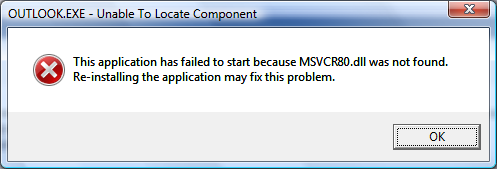
Turns out the problem is caused by the Acer eDataSecurity Outlook Add-in which is installed automatically on your new Acer system. This Add-in is not compatible with Microsoft Office 2007 so you either need to uninstall Acer eDataSecurity from the Windows Control Panel or disable the Add-in.
I opted for disabling the Add-in as I used other features of Acer eDataSecurity. The catch was that to disable the Add-in using conventional means you need to do it from within Outlook, but Outlook won’t start with this Add-in enabled! To get around this I used a registry editor to disable it.
Open your registry editor by running “regedt32” and browse to Computer\HKEY_LOCAL_MACHINE\SOFTWARE\Microsoft\Office\Outlook\Addins\OAddin.Addin
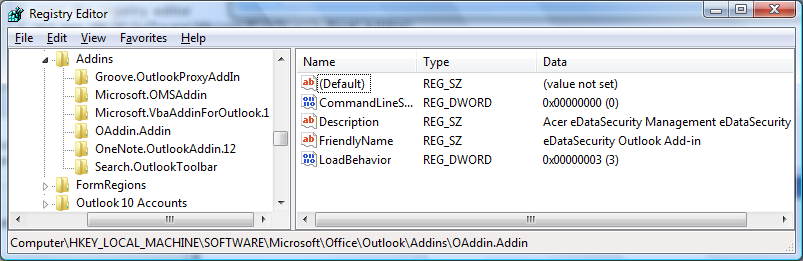
Then change the value of the LoadBehaviour key and change it to 0. This will disable the Add-in.
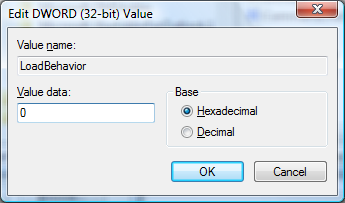
But, Outlook still won’t start! The problem is that the Add-in has already done its damage to Outlook and by disabling it all we’ve done is prevent it from corrupting Outlook the next time it runs.
What the Add-in did was modify or remove the “outlook.exe.manifest” file from the Microsoft Office installation directory (by default, this is C:\Program Files\Microsoft Office\Office12). This file is hidden, if you would like to see it in the directory listing, enable viewing of hidden files (Tools->Folder Options->View Tab->Files and Folders->Hidden files and folders->Show hidden files and folders)
We need to repair that file before Outlook will start and Microsoft has provided us with a tool to do this, installed as part of Office 2007. Go to your Start Menu, All Programs -> Microsoft Office -> Microsoft Office Tools -> Microsoft Office Diagnostics.
Let Microsoft Office Diagnostics finish its run and it should mention under Setup Diagnostic that it repaired all Microsoft Office installation problems it could find.
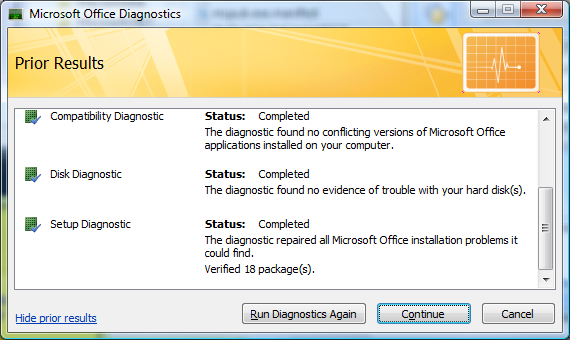
Office 2007 should now start.
Thank you for posting this fix. Had same problem with my Aspire 5630, this fixed it. 🙂
I run Outlook 2003 from my Acer Aspire 5110. It has been working fine except that creating a new message or calendar item in Outlook clears my clipboard. It’s been a major annoyance anytime I want to paste something into an email. I had no idea it was related to Acer Edatasecurity.
I disabled the edatasecurity add-in in outlook at: Tools, Options, Other, Advanced Options dialog then clicked the COM add-ins button.
This fix is lifechanging. THANK YOU!!!!
I have a new Acer Quad core desktop (aspire M5630) that has the exact same problem when running outlook 2007. thank you for your solution!!!
I thought this would work, but I still get the error… it didn’t work! Any further suggestions?
I have a Acer Aspire M5630 Quad Core desktop that I bought at BestBuy 2 days ago (January 29, 2008) — it has the same problem.
I tried this here — did not work.
I tried many recommendations on different blogs (even German and French ones) — removing Norton/Symantec, registry edits, change outlook.manifest.exe folder location, etc. — did not work
Here is what worked so far:
1. totally uninstalled Microsoft Office 2007, rebooted,
2. uninstalled the Microsoft Office 2007 Home and Student (trial) version that came with the Acer, uninstalled the Microsoft Office 2007 Authorization/Verification software (whatever it is called — don’t remember), rebooted
3. removed Acer’s eData Security Management under remove programs in Vista, rebooted,
4. reinstalled Microsoft Office 2007, rebooted
5. have not yet installed Office 2007 SP1…(I’m worried it will screw things up, but it might be ok)
5. Outlook will open up everytime and still has the previously created accounts/profiles…
I suspect the problem has something to do with Acer’s eData Security Management application and/or the Office 2007 SP1, although I am not sure….all I know is that Office 2007 works now for the first time on this PC…
after installing microsoft offcie 2007 SP1, the error is back…this definitely has something to do with the SP1…
This was an extremely well thought out response. The fix for me work exactly as you laid out. I have a new Acer 5720-6514 w/250GB HD and 3GB RAM. This is one of their latest machines. This is a serious problem for ACER as I’m sure tens of thousands of people will be migrating to Outlook 2007 on their machines.
Thank you. It worked for me too.
Oh my God thank you so much! I have looked everywhere for the solution to this problem and you guys are the only place I could find that give clear and concise answers and directions. It was so easy and straightforward. Thank you!
Thank you very much, I tried many method found on Internet but only this one worked.
Un-Install office 2007, reboot, Install Office 2007 again, then use this method to solve the problem, it worked.
AndreMiller, u r great!!!
It solved the problem on my Aspire 5920! 😉
It really works! Thank you very much! You help me a lot.
Worked !. Thank You
ACER Extensa 5620 – 6830 with Vista
Same problem on Aspire 7720G, now it’s OK. Thanks
I try it my self and it works. Be carefule if you update. Do not install update number KB946983 for microsoft outlook because it will ruin everything and you will be back to zero.
No problem with Office SP1 .Do not install KB946983.
I tried it too! And yes, the security update KB946983 for outlook must not be installed again!
After doing the above described procedure with regedt32, I removed and reinstalled the Office completely, because Microsoft Office Diagnostic couldn’t help!
Then I installed SP1 and the other security updates of office. Unfortunately I then encountered the problem with the MSVCR80.dll again! Uninstalling the KB946983 fixed the problem again 😉
Outlook 2007 is now working on my Acer Aspire 5682.
It really fixed the problem on ACER TravelMate 4720 too. Thanks a lot!!!
The problem comes from the acer escure data management that is installed with oem windows vista.
You uninstall, and repair office, and it’s ok
Excellent Dude well done fixed my problem with the RECA too 🙂
new acer 5920/ vista / outlook 2007 have been at it for 6 hours now, and this is the solution – uninstalling that update finally did it. repaired office rather than reinstalling and seems to be ok at mo.
thank you so much – esecurity entirely uninstalled at this point, but i can work backwards once i have time…
Any idea what Acer or Microsoft are going to do to address this???
Mine is Aspire 5610Z and really do appreciate the solution I found here!
After the registry change I had to uninstall and reinstall Office 2007. Just running the office diagnostic tool didn’t fix it.
Now I can buy Moto Q and sync with my Outlook! 🙂
Reinstall MSN Messenger. After that, run the patch below to regain Msn running with administrator credentials:
http://www.acerpanam.com/synapse/data/7117/documents/eDSMSN81patch.exe
Regards,
Mienzelf
Merci pour cette info Ca marche j’étais au bord de la crise de nerf
Andre Miller, Thank you very much. I own three computers, all (new) Acers, and all have, or rather had the same problem. Your fix works great.
But for the fast typists among us, there’s a little improvement to the tip:
It occured to me that the installation procedure of Outlook 2007 is rather slow. In this case, it can help you to solve this problem even before it occurs!
If installation of outlook2007 is at approximately 80%, the application has already been registered in the registry, and at that time there’s just enough time to go to the registry, edit the value of the registry key according to your description, and then save the registry. You will be finished doing that before Outlook 2007 starts the first time, so the problem will never occur. Hence you don’t need the repair procedure afterwards 😉
Many thanks!
Erik.
I really was optomistic that this would help but it didn’t. I did all the steps mentioned above and restarted, still got the error. I uninstalled norton, acer edata security management, and uninstalled office. I rebooted and reinstalled office 2007, still got the error. I have an acer extensa 5420-5687. Any other suggestions? I am switching to Mozilla Thunderbird until a solution that works for me comes about.
Thank you Andre Miller your solution worked fine with my acer 5920G and my outlook 2007. Well done
Thanks so much! Very detailed and considerate posting of an incredibly difficult issue with no official information available anywhere! I wondered why when I bought my Acer Aspire 5270Z it had preloaded Office with NO outlook.
I too had to uninstall and reinstall office after the procedures outlined above, as well as remove edata.
Nonetheless, am very pleased it is finally functioning after some 24 hours of stuffing around.
Thanks so much for extending your expertise and time to the rest of us. There should be more people like you in the world.
🙂
FFS why do they install the damn trial in the first place knowing it won’t work. your a life saver. thought i’d bought office for nothing lol
Dear All,
I’ve had this issue before and eData Management Security was blocking the Outlook so I’ve un-installed the eData Management and then re-install the Outlook and everything is working fine now 🙂
Same problem on Acer Aspire 9920 after installing sp1….uninstalled acer management security, uninstalled office2007, rebooted, installed office2007 without sp1 and it works….
Thanks to everybody for this contribution.
This post literally saved my job, and so, my life. My first born is on their way to you by Parcelforce 24 in gratitude.
thankyou! thankyou! thankyou!
this worked! ASPIRE 5920. shame on ACER!
I have already tried to post this once, but forgot to pass the anti-spam test, so I am sending again to be sure. I want to thank you so much for your fix. I have an Acer laptop Aspire 7520 and I have been tearing my hair out because every time I open an email in Outlook, the system reconfigures. I have been scouring the internet and have found numerous accounts of similar problems and a few suggested solutions, all of which I have tried. I have uninstalled, reinstalled, deleted users and regedited, none of which have helped. Then I chanced upon your fix and you have saved me from the prospect of a life without outlook! I hope that all the other poor souls out there with the same problem find your site. Thank you very much for your philanthropy.
I have the Acer 5420 with the same problems, Uninstalled the e-data security, disabled all add-ins, repaired office install and Outlook works.. Made the mistake of doing all updates and I am back to error missing file…arrggghhh… restored to before updates and am working again. Do I need to completely remove all of the e-power features?
Thanks
Sun, 03/23/2008 – 12:44 — Augigr (not verified)
Check this
I try it my self and it works. Be carefule if you update. Do not install update number KB946983 for microsoft outlook because it will ruin everything and you will be back to zero.
Thanks you made my day, it work i uninstall Norton and install RegCure dint work. I fallow al you steps and work Thanks.
Thanks a lot for posting this fix, it helped me out with my Acer TM 6292.
Removed the KB946983 and now Outlook finally works again, thanks for the ultimate solution!
Well its a year since this post was started and I just got my first Acer (7720G) Dec. 2008 and experienced exactly the same issue. I wasted 2 days over xmas trying to sort it before finding this post – thank you so much, saves my fastly thinning hair!
Outlook now works after installing Vista SP1 and all Outlook updates, including Office SP1, but leaving out the KB946983 update as above. I can open Outlook now, but every time I do I get the Vista warning boxes;
“Microsoft Office Outlook has stopped working”, it then searches for the solution, and states it will close the program down until a solution is found. I click OK and the warning goes away leaving Outlook working as normal – very annoying as you can imagine.
I deleted the Acer eData Security program as above, but all other Acer software is still on the laptop.
Anybody a clue as to where i can look for the cause of that issue?
Unbelievable that I wasted so many hours trying to fix this issue. Installed , uninstalled, reinstalled Office 2007 at least three times, applied service packs, etc….
Thank you, thank you, thank you. Your explanation was so clear and direct and instructions to fix the issue where to the point. Microsoft should have you on staff.
Thanks again.
I have spent 2 days trying to figure out how to fix this problem. I’m so glad I found your page in my search. I did have to uninstall and reinstall office after I followed your steps, but other than that you were on point. I think you are the only person alive who was able to figure this out. Thank you very much for sharing your answer with us.
I’ve spent all night and half day to solve this problem. This made me mad!
Finally I’ve got way to solve this damn problem!
1. Uninstall Acer eDataSecurity.
2. Uninstall office.
3. Clean all of your temporary file by typing ” %temp ” in run command , erase everything you can clean!
4. Restart your Acer.
5. Re-install office again.
Remember !!! DO NOT INSTALL UPDATE KB946983 !!!! If you don’t want to repair it again.
Thanks Adre,
registry edit and Office Diagnostics fixed issue for me (Acer Aspire 7720) too.
Thank you so much, I can not begin to show my gratitude. I spent numerous hours trying to get Outlook to work on my Acer desktop Quad core computer. This instructions worked great. Thank you so much. I am so excited now…
Just curious about one thign, I have unselected the KB946983 update from the windows update… will I always have to check the windows updates in the future so that it won’t install ever again. I don’t want anything to come in the way of my outlook… can’t bear through this pain again.
Thanks again and I will be checking this column for any info on the future updates.
Thank you very much Andre! It worked!
Aspire M3610, Windows Vista Home Premium SP1, Office Small Business 2007
I have been working with this computer for more than 6 months and installed Office 2007 3 months ago. No problems during this period.
I am thinking of the action(s) I did to make this problem appear but I can only say that I found this problem after cleaning registry. I use several programs (Ccleaner, Glary, RegSeeker) to clean the registry so, unfortunately, I am not sure about which one caused the problem.
Getting rid of the security worked for Outlook, but Publisher 07 was still looking for MSVCR80. Eventually I right clicked the properties and changed the compatability to an older version of Windows and it works.
Ok, firstly a great page with very clear and comprehensive guidelines; seems to have worked for many.
Problem is, it didn’t work for me. I have spent hours over a period of, quite literally, 18 months trying every possible solutions I could find on the web. Nothing worked.
In the end, I right clicked the Outlook 2007 icon, went to properties and under the “compatibility” tab checked the “run this programme in compatibility mode for:” and selected “Windows XP (Service Pack 2).
Now seems to be working and I cannot even express my joy, although somewhat tarnished by the wasted time over the months for a solution that took but a few seconds!
Hey,
Thank you so much for this post, i had this issue and it worked a treat. Instructions are very clear too.
Thanks a million
Ali
You are god! (as james hetfield is), i had this problem for a long time, and now its solved!!
Thanks for posting your solution and an easy to use desription !
Unfortunately it did not work for me Acer Aspire 9420.
But I found the other solution on this page !! Thanks !!
I used the method: right clicked the properties and changed the compatability to an older version of Windows and it works. After the second restart outlook now works gain without the compatibility mode – god nows why !!
Thanks and greetings from Berlin
Many thanks for your solution – I’d been scratching my head and going round in circles for two weeks but this sorted me out straight away!
Brilliant. It works!
For me the problem is the SP2, if i install i have the problem!
Absolutely brilliant. After three re-installs I read this and all worked well. Acer 7720. Before the fix the machine also slowed at least 50%. Many thanks
Well, I have a Toshiba Satellite A205-S480 (I think), and I’ve been getting this problem for a couple of weeks now. I thought I found a solution (something similar to this), but it’s back. The problem that I’m in “the sticks” (military field training), and I CANNOT install…re-sinstall…ad nauseum because I DON’T HAVE MY DAMN CDS WITH ME!!!! WTF am I supposed to do for the next couple of months? I can’t even find Outlook Express on the machine any more so I can tie myself over until I get home….
Sometimes Windows pissed me off!!!!!!
I found a temporary solution to this problem….simply put, upon the computer starting, I pressed F8 and then had it start up in a previously-known good setting. It worked!
Well, it worked until today, when Microshit put their new updates out. I made the mistake of updating my computer, and my Outlook started again. Thus, if you update your computer, you’ll have the same problems.
Thankfully I’m home now, and I can re-install everything. Now it’ll take me forever to get things back to the way that I had it. Thrilling!
Thanks for the excellent explanation, it worked. However on my Acer 9303 the problem returned, I don’t why. Luckily, the compatibility change to XP seems to work. Acer should be ashamed that it doesn’t communicatie this
Thank alot for the help. TheMicrosoft Office Diagnostics solve the my problem. Thanks again…!!!
I was really hoping this could finally fix the problem, but unfortunately it didn’t.
1. There is no such registry entry in my computer (Acer Travelmate 5720, Windows 7).
2. Migrating to Win 7 I finally even formated my hard drive and here is the kicker: although eDataSecurity and any other Acer software is uninstalled, it still occurs the same error.
Any ideas?
Totally fantastic! thanx a lot 4 this 3d. i solved trouble whit my acer aspire 5720!!!
Thanks, this worked on my ACER 5510 3GB/Vista !!!!! Wished I had found this solution sooner.
Why did Acer not solve / publish this solution? GRRRRRRRR.
thanks so much. this solved my outlook 2007 installation problem on my acer aspire
Thanks so much for this post! I’ve been trying to fix my outlook since morning and ur post helped me!
This plus the comments worked…uninstall the edata software…reboot…uninstall office reboot…reinstal office…before opening anything run office diagnostics from start menu….open outlook issue resolved. FINALLY 3 DAYS!!!!!
Problem came back after windows update….update was not listed KB946983….but Office suite SP2 was…who knows what is listed in there….sigh….
My hero. Thanks for the detail. So often you’ll find something on the internet to solve a problem but the author will just say something like “use the registry editor to deactivate the addin” an leave it at that. It’s so nice that you were precise.
Excellent. Thank you so much for the straight forward instructions on how to fix my MSVCR80.dll error for Outlook, it has stopped me from pulling my hair out!!
Had the same issue with Acer 9300 Vista Home Premium. Uninstalled eDataSecurity used the repair app and voila 🙂
UNREAL! I’ve used Office 2007 or a long time. It’s always been great. When I got my Acer 5630 ALL the office components worked, except Outlook. Could NEVER get it to work. (It works fine on my desktop machine) Tried your solution, but no go. Looked to un-install the KB946983 update, but I don’t have it installed. I have Office service packs right to 3 installed and did not want to go back to SP1 to correct the problem.
SOLUTION!!! Changed the Compatibility mode of the Outlook.exe to XP SP2 and it runs just fine!! Who knew!? I’d sort of given up getting Outlook to work – been a couple years now… really glad to have it back on my laptop!
THANKS SO MUCH PEOPLE!
Explicaciones excelentes para resolver mi problema. He seguido las instrucciones paso a paso y Outlook 2007 funcionó!!!!!
Gracias.
OMG!! Thank you thank you THANK YOU!
This worked perfectly!!
diagnostic did not work but repair option from add/remove programs did…thanks for the post
i don’t use any of the acer programs so I uninstalled. When I uninstalled the Acer Empowering Technology application the eDataSecurity went with it presumable because it’s gone now and that registry entry does not exist.
Somehow this made things worse for me because outlook will not load. I have done diagnostics, repairs, and a complete re-install with no luck.